
NIO
更新: 12/22/2025 字数: 0 字 时长: 0 分钟
基本介绍
NIO 的介绍:
Java NIO(New IO、Java non-blocking IO),从 Java 1.4 版本开始引入的一个新的 IO API,可以替代标准的 Java IO API,NIO 支持面向缓冲区的、基于通道的 IO 操作,以更加高效的方式进行文件的读写操作
- NIO 有三大核心部分:Channel(通道),Buffer(缓冲区),Selector(选择器)
- NIO 是非阻塞 IO,传统 IO 的 read 和 write 只能阻塞执行,线程在读写 IO 期间不能干其他事情,比如调用 socket.accept(),如果服务器没有数据传输过来,线程就一直阻塞,而 NIO 中可以配置 Socket 为非阻塞模式
- NIO 可以做到用一个线程来处理多个操作的。假设有 1000 个请求过来,根据实际情况可以分配 20 或者 80 个线程来处理,不像之前的阻塞 IO 那样分配 1000 个
NIO 和 BIO 的比较:
BIO 以流的方式处理数据,而 NIO 以块的方式处理数据,块 I/O 的效率比流 I/O 高很多
BIO 是阻塞的,NIO 则是非阻塞的
BIO 基于字节流和字符流进行操作,而 NIO 基于 Channel 和 Buffer 进行操作,数据从通道读取到缓冲区中,或者从缓冲区写入到通道中。Selector 用于监听多个通道的事件(比如:连接请求,数据到达等),因此使用单个线程就可以监听多个客户端通道
NIO BIO 面向缓冲区(Buffer) 面向流(Stream) 非阻塞(Non Blocking IO) 阻塞 IO(Blocking IO) 选择器(Selectors)
实现原理
NIO 三大核心部分:Channel (通道)、Buffer (缓冲区)、Selector (选择器)
Buffer 缓冲区
缓冲区本质是一块可以写入数据、读取数据的内存,底层是一个数组,这块内存被包装成 NIO Buffer 对象,并且提供了方法用来操作这块内存,相比较直接对数组的操作,Buffer 的 API 更加容易操作和管理
Channel 通道
Java NIO 的通道类似流,不同的是既可以从通道中读取数据,又可以写数据到通道,流的读写通常是单向的,通道可以非阻塞读取和写入通道,支持读取或写入缓冲区,也支持异步地读写
Selector 选择器
Selector 是一个 Java NIO 组件,能够检查一个或多个 NIO 通道,并确定哪些通道已经准备好进行读取或写入,这样一个单独的线程可以管理多个 channel,从而管理多个网络连接,提高效率
NIO 的实现框架:

- 每个 Channel 对应一个 Buffer
- 一个线程对应 Selector,一个 Selector 对应多个 Channel(连接)
- 程序切换到哪个 Channel 是由事件决定的,Event 是一个重要的概念
- Selector 会根据不同的事件,在各个通道上切换
- Buffer 是一个内存块,底层是一个数组
- 数据的读取写入是通过 Buffer 完成的 , BIO 中要么是输入流,或者是输出流,不能双向,NIO 的 Buffer 是可以读也可以写,flip() 切换 Buffer 的工作模式
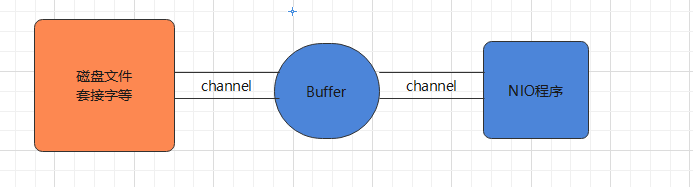
Java NIO 系统的核心在于:通道和缓冲区,通道表示打开的 IO 设备(例如:文件、套接字)的连接。若要使用 NIO 系统,获取用于连接 IO 设备的通道以及用于容纳数据的缓冲区,然后操作缓冲区,对数据进行处理。简而言之,Channel 负责传输,Buffer 负责存取数据
缓冲区
基本介绍
缓冲区(Buffer):缓冲区本质上是一个可以读写数据的内存块,用于特定基本数据类型的容器,用于与 NIO 通道进行交互,数据是从通道读入缓冲区,从缓冲区写入通道中的
Buffer 底层是一个数组,可以保存多个相同类型的数据,根据数据类型不同,有以下 Buffer 常用子类:ByteBuffer、CharBuffer、ShortBuffer、IntBuffer、LongBuffer、FloatBuffer、DoubleBuffer
基本属性
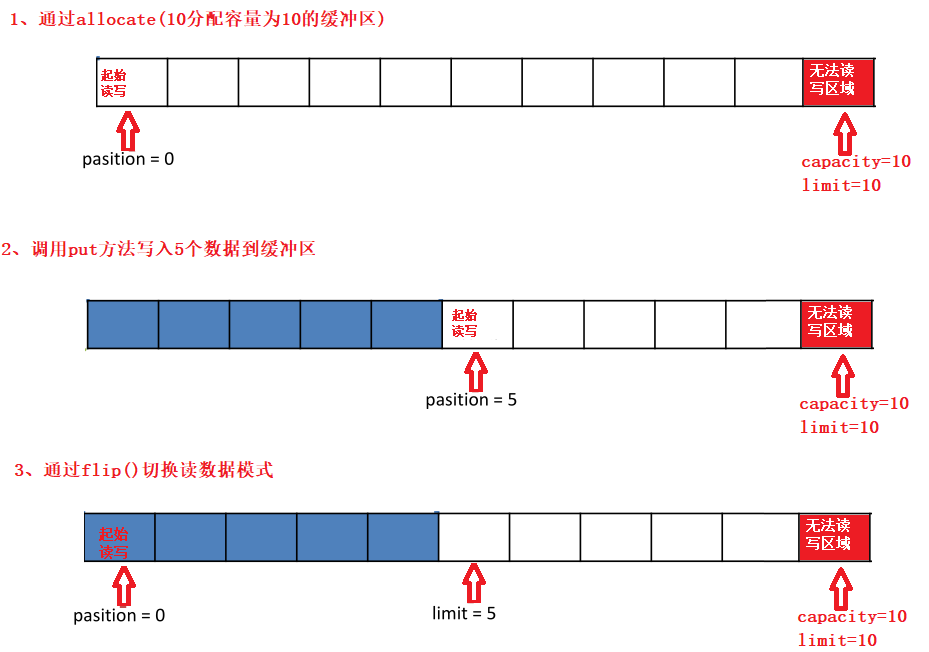
容量(capacity):作为一个内存块,Buffer 具有固定大小,缓冲区容量不能为负,并且创建后不能更改
限制(limit):表示缓冲区中可以操作数据的大小(limit 后数据不能进行读写),缓冲区的限制不能为负,并且不能大于其容量。写入模式,limit 等于 buffer 的容量;读取模式下,limit 等于写入的数据量
位置(position):下一个要读取或写入的数据的索引,缓冲区的位置不能为负,并且不能大于其限制
标记(mark)与重置(reset):标记是一个索引,通过 Buffer 中的 mark() 方法指定 Buffer 中一个特定的位置,可以通过调用 reset() 方法恢复到这个 position
位置、限制、容量遵守以下不变式: 0 <= position <= limit <= capacity
常用 API
static XxxBuffer allocate(int capacity):创建一个容量为 capacity 的 XxxBuffer 对象
Buffer 基本操作:
| 方法 | 说明 |
|---|---|
public Buffer clear() | 清空缓冲区,不清空内容,将位置设置为零,限制设置为容量 |
public Buffer flip() | 翻转缓冲区,将缓冲区的界限设置为当前位置,position 置 0 |
public int capacity() | 返回 Buffer 的 capacity 大小 |
public final int limit() | 返回 Buffer 的界限 limit 的位置 |
public Buffer limit(int n) | 设置缓冲区界限为 n |
public Buffer mark() | 在此位置对缓冲区设置标记 |
public final int position() | 返回缓冲区的当前位置 position |
public Buffer position(int n) | 设置缓冲区的当前位置为 n |
public Buffer reset() | 将位置 position 重置为先前 mark 标记的位置 |
public Buffer rewind() | 将位置设为为 0,取消设置的 mark |
public final int remaining() | 返回当前位置 position 和 limit 之间的元素个数 |
public final boolean hasRemaining() | 判断缓冲区中是否还有元素 |
public static ByteBuffer wrap(byte[] array) | 将一个字节数组包装到缓冲区中 |
abstract ByteBuffer asReadOnlyBuffer() | 创建一个新的只读字节缓冲区 |
public abstract ByteBuffer compact() | 缓冲区当前位置与其限制(如果有)之间的字节被复制到缓冲区的开头 |
Buffer 数据操作:
| 方法 | 说明 |
|---|---|
public abstract byte get() | 读取该缓冲区当前位置的单个字节,然后位置 - 1 |
public ByteBuffer get(byte[] dst) | 读取多个字节到字节数组 dst 中 |
public abstract byte get(int index) | 读取指定索引位置的字节,不移动 position |
public abstract ByteBuffer put(byte b) | 将给定单个字节写入缓冲区的当前位置,position+1 |
public final ByteBuffer put(byte[] src) | 将 src 字节数组写入缓冲区的当前位置 |
public abstract ByteBuffer put(int index, byte b) | 将指定字节写入缓冲区的索引位置,不移动 position |
提示:"\n",占用两个字节
读写数据
使用 Buffer 读写数据一般遵循以下四个步骤:
- 写入数据到 Buffer
- 调用 flip() 方法,转换为读取模式
- 从 Buffer 中读取数据
- 调用 buffer.clear() 方法清除缓冲区(不是清空了数据,只是重置指针)
public class TestBuffer {
    @Test
    public void test(){
        String str = "seazean";
        //1. 分配一个指定大小的缓冲区
        ByteBuffer buffer = ByteBuffer.allocate(1024);
        System.out.println("-----------------allocate()----------------");
        System.out.println(bufferf.position());//0
        System.out.println(buffer.limit());//1024
        System.out.println(buffer.capacity());//1024

        //2. 利用 put() 存入数据到缓冲区中
        buffer.put(str.getBytes());
        System.out.println("-----------------put()----------------");
        System.out.println(bufferf.position());//7
        System.out.println(buffer.limit());//1024
        System.out.println(buffer.capacity());//1024

        //3. 切换读取数据模式
        buffer.flip();
        System.out.println("-----------------flip()----------------");
        System.out.println(buffer.position());//0
        System.out.println(buffer.limit());//7
        System.out.println(buffer.capacity());//1024

        //4. 利用 get() 读取缓冲区中的数据
        byte[] dst = new byte[buffer.limit()];
        buffer.get(dst);
        System.out.println(dst.length);
        System.out.println(new String(dst, 0, dst.length));
        System.out.println(buffer.position());//7
        System.out.println(buffer.limit());//7

        //5. clear() : 清空缓冲区。但是缓冲区中的数据依然存在,但是处于“被遗忘”状态
        System.out.println(buffer.hasRemaining());//true
        buffer.clear();
        System.out.println(buffer.hasRemaining());//true
        System.out.println("-----------------clear()----------------");
        System.out.println(buffer.position());//0
        System.out.println(buffer.limit());//1024
        System.out.println(buffer.capacity());//1024
    }
}粘包拆包
网络上有多条数据发送给服务端,数据之间使用 \n 进行分隔,但这些数据在接收时,被进行了重新组合
// Hello,world\n
// I'm zhangsan\n
// How are you?\n
------ > 黏包,半包
// Hello,world\nI'm zhangsan\nHo
// w are you?\npublic static void main(String[] args) {
ByteBuffer source = ByteBuffer.allocate(32);
// 11 24
source.put("Hello,world\nI'm zhangsan\nHo".getBytes());
split(source);
source.put("w are you?\nhaha!\n".getBytes());
split(source);
}
private static void split(ByteBuffer source) {
source.flip();
int oldLimit = source.limit();
for (int i = 0; i < oldLimit; i++) {
if (source.get(i) == '\n') {
// 根据数据的长度设置缓冲区
ByteBuffer target = ByteBuffer.allocate(i - 1 - source.position());
// 0 ~ limit
source.limit(i - 1);
target.put(source); // 从 source 读,向 target 写
// debugAll(target); 访问 buffer 的方法
source.limit(oldLimit);
}
}
// 访问过的数据复制到开头
source.compact();
}直接内存
基本介绍
Byte Buffer 有两种类型,一种是基于直接内存(也就是非堆内存),另一种是非直接内存(也就是堆内存)
Direct Memory 优点:
- Java 的 NIO 库允许 Java 程序使用直接内存,使用 native 函数直接分配堆外内存
- 读写性能高,读写频繁的场合可能会考虑使用直接内存
- 大大提高 IO 性能,避免了在 Java 堆和 native 堆来回复制数据
直接内存缺点:
- 不能使用内核缓冲区 Page Cache 的缓存优势,无法缓存最近被访问的数据和使用预读功能
- 分配回收成本较高,不受 JVM 内存回收管理
- 可能导致 OutOfMemoryError 异常:OutOfMemoryError: Direct buffer memory
- 回收依赖 System.gc() 的调用,但这个调用 JVM 不保证执行、也不保证何时执行,行为是不可控的。程序一般需要自行管理,成对去调用 malloc、free
应用场景:
- 传输很大的数据文件,数据的生命周期很长,导致 Page Cache 没有起到缓存的作用,一般采用直接 IO 的方式
- 适合频繁的 IO 操作,比如网络并发场景
数据流的角度:
- 非直接内存的作用链:本地 IO → 内核缓冲区→ 用户(JVM)缓冲区 →内核缓冲区 → 本地 IO
- 直接内存是:本地 IO → 直接内存 → 本地 IO
JVM 直接内存图解:


通信原理
堆外内存不受 JVM GC 控制,可以使用堆外内存进行通信,防止 GC 后缓冲区位置发生变化的情况
NIO 使用的 SocketChannel 也是使用的堆外内存,源码解析:
SocketChannel#write(java.nio.ByteBuffer) → SocketChannelImpl#write(java.nio.ByteBuffer)
javapublic int write(ByteBuffer var1) throws IOException { do { var3 = IOUtil.write(this.fd, var1, -1L, nd); } while(var3 == -3 && this.isOpen()); }IOUtil#write(java.io.FileDescriptor, java.nio.ByteBuffer, long, sun.nio.ch.NativeDispatcher)
javastatic int write(FileDescriptor var0, ByteBuffer var1, long var2, NativeDispatcher var4) { // 【判断是否是直接内存,是则直接写出,不是则封装到直接内存】 if (var1 instanceof DirectBuffer) { return writeFromNativeBuffer(var0, var1, var2, var4); } else { //.... // 从堆内 buffer 拷贝到堆外 buffer ByteBuffer var8 = Util.getTemporaryDirectBuffer(var7); var8.put(var1); //... // 从堆外写到内核缓冲区 int var9 = writeFromNativeBuffer(var0, var8, var2, var4); } }读操作相同
分配回收
直接内存创建 Buffer 对象:static XxxBuffer allocateDirect(int capacity)
DirectByteBuffer 源码分析:
DirectByteBuffer(int cap) {
    //....
    long base = 0;
    try {
        // 分配直接内存
        base = unsafe.allocateMemory(size);
    }
    // 内存赋值
    unsafe.setMemory(base, size, (byte) 0);
    if (pa && (base % ps != 0)) {
        address = base - ps - (base & (ps - 1));
    } else {
        address = base;
    }
    // 创建回收函数
    cleaner = Cleaner.create(this, new Deallocator(base, size, cap));
}
private static class Deallocator implements Runnable {
    public void run() {
        unsafe.freeMemory(address);
        //...
    }
}分配和回收原理:
- 使用了 Unsafe 对象的 allocateMemory 方法完成直接内存的分配,setMemory 方法完成赋值
- ByteBuffer 的实现类内部,使用了 Cleaner(虚引用)来监测 ByteBuffer 对象,一旦 ByteBuffer 对象被垃圾回收,那么 ReferenceHandler 线程通过 Cleaner 的 clean 方法调用 Deallocator 的 run 方法,最后通过 freeMemory 来释放直接内存
/**
 - 直接内存分配的底层原理:Unsafe
 */
public class Demo1_27 {
    static int _1Gb = 1024 - 1024 - 1024;

    public static void main(String[] args) throws IOException {
        Unsafe unsafe = getUnsafe();
        // 分配内存
        long base = unsafe.allocateMemory(_1Gb);
        unsafe.setMemory(base, _1Gb, (byte) 0);
        System.in.read();
        // 释放内存
        unsafe.freeMemory(base);
        System.in.read();
    }

    public static Unsafe getUnsafe() {
        try {
            Field f = Unsafe.class.getDeclaredField("theUnsafe");
            f.setAccessible(true);
            Unsafe unsafe = (Unsafe) f.get(null);
            return unsafe;
        } catch (NoSuchFieldException | IllegalAccessException e) {
            throw new RuntimeException(e);
        }
    }
}共享内存
FileChannel 提供 map 方法返回 MappedByteBuffer 对象,把文件映射到内存,通常情况可以映射整个文件,如果文件比较大,可以进行分段映射,完成映射后对物理内存的操作会被同步到硬盘上
FileChannel 中的成员属性:
MapMode.mode:内存映像文件访问的方式,共三种:
MapMode.READ_ONLY:只读,修改得到的缓冲区将导致抛出异常MapMode.READ_WRITE:读/写,对缓冲区的更改最终将写入文件,但此次修改对映射到同一文件的其他程序不一定是可见MapMode.PRIVATE:私用,可读可写,但是修改的内容不会写入文件,只是 buffer 自身的改变
public final FileLock lock():获取此文件通道的排他锁
MappedByteBuffer,可以让文件在直接内存(堆外内存)中进行修改,这种方式叫做内存映射,可以直接调用系统底层的缓存,没有 JVM 和 OS 之间的复制操作,提高了传输效率,作用:
- 可以用于进程间的通信,能达到共享内存页的作用,但在高并发下要对文件内存进行加锁,防止出现读写内容混乱和不一致性,Java 提供了文件锁 FileLock,但在父/子进程中锁定后另一进程会一直等待,效率不高
- 读写那些太大而不能放进内存中的文件,分段映射
MappedByteBuffer 较之 ByteBuffer 新增的三个方法:
final MappedByteBuffer force():缓冲区是 READ_WRITE 模式下,对缓冲区内容的修改强制写入文件final MappedByteBuffer load():将缓冲区的内容载入物理内存,并返回该缓冲区的引用final boolean isLoaded():如果缓冲区的内容在物理内存中,则返回真,否则返回假
public class MappedByteBufferTest {
    public static void main(String[] args) throws Exception {
        // 读写模式
        RandomAccessFile ra = new RandomAccessFile("1.txt", "rw");
        // 获取对应的通道
        FileChannel channel = ra.getChannel();

        /**
         - 参数 1   FileChannel.MapMode.READ_WRITE 使用的读写模式
         - 参数 2   0: 文件映射时的起始位置
         - 参数 3   5: 是映射到内存的大小(不是索引位置),即将 1.txt 的多少个字节映射到内存
         - 可以直接修改的范围就是 0-5
         - 实际类型 DirectByteBuffer
         */
        MappedByteBuffer buffer = channel.map(FileChannel.MapMode.READ_WRITE, 0, 5);

        buffer.put(0, (byte) 'H');
        buffer.put(3, (byte) '9');
        buffer.put(5, (byte) 'Y');  //IndexOutOfBoundsException

        ra.close();
        System.out.println("修改成功~~");
    }
}从硬盘上将文件读入内存,要经过文件系统进行数据拷贝,拷贝操作是由文件系统和硬件驱动实现。通过内存映射的方法访问硬盘上的文件,拷贝数据的效率要比 read 和 write 系统调用高:
- read() 是系统调用,首先将文件从硬盘拷贝到内核空间的一个缓冲区,再将这些数据拷贝到用户空间,实际上进行了两次数据拷贝
- mmap() 也是系统调用,但没有进行数据拷贝,当缺页中断发生时,直接将文件从硬盘拷贝到共享内存,只进行了一次数据拷贝
注意:mmap 的文件映射,在 Full GC 时才会进行释放,如果需要手动清除内存映射文件,可以反射调用 sun.misc.Cleaner 方法
参考文章:https://www.jianshu.com/p/f90866dcbffc
通道
基本介绍
通道(Channel):表示 IO 源与目标打开的连接,Channel 类似于传统的流,只不过 Channel 本身不能直接访问数据,Channel 只能与 Buffer 进行交互
NIO 的通道类似于流,但有些区别如下:
- 通道可以同时进行读写,而流只能读或者只能写
- 通道可以实现异步读写数据
- 通道可以从缓冲读数据,也可以写数据到缓冲
BIO 中的 Stream 是单向的,NIO 中的 Channel 是双向的,可以读操作,也可以写操作
Channel 在 NIO 中是一个接口:
public interface Channel extends Closeable{}
Channel 实现类:
FileChannel:用于读取、写入、映射和操作文件的通道,只能工作在阻塞模式下
- 通过 FileInputStream 获取的 Channel 只能读
- 通过 FileOutputStream 获取的 Channel 只能写
- 通过 RandomAccessFile 是否能读写根据构造 RandomAccessFile 时的读写模式决定
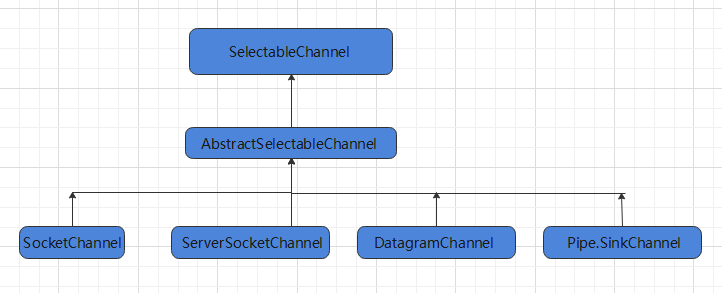
DatagramChannel:通过 UDP 读写网络中的数据通道
SocketChannel:通过 TCP 读写网络中的数据
ServerSocketChannel:可以监听新进来的 TCP 连接,对每一个新进来的连接都会创建一个 SocketChannel
提示:ServerSocketChanne 类似 ServerSocket、SocketChannel 类似 Socket
常用 API
获取 Channel 方式:
- 对支持通道的对象调用
getChannel()方法 - 通过通道的静态方法
open()打开并返回指定通道 - 使用 Files 类的静态方法
newByteChannel()获取字节通道
Channel 基本操作:读写都是相对于内存来看,也就是缓冲区
| 方法 | 说明 |
|---|---|
| public abstract int read(ByteBuffer dst) | 从 Channel 中读取数据到 ByteBuffer,从 position 开始储存 |
| public final long read(ByteBuffer[] dsts) | 将 Channel 中的数据分散到 ByteBuffer[] |
| public abstract int write(ByteBuffer src) | 将 ByteBuffer 中的数据写入 Channel,从 position 开始写出 |
| public final long write(ByteBuffer[] srcs) | 将 ByteBuffer[] 到中的数据聚集到 Channel |
| public abstract long position() | 返回此通道的文件位置 |
| FileChannel position(long newPosition) | 设置此通道的文件位置 |
| public abstract long size() | 返回此通道的文件的当前大小 |
SelectableChannel 的操作 API:
| 方法 | 说明 |
|---|---|
| SocketChannel accept() | 如果通道处于非阻塞模式,没有请求连接时此方法将立即返回 NULL,否则将阻塞直到有新的连接或发生 I/O 错误,通过该方法返回的套接字通道将处于阻塞模式 |
| SelectionKey register(Selector sel, int ops) | 将通道注册到选择器上,并指定监听事件 |
| SelectionKey register(Selector sel, int ops, Object att) | 将通道注册到选择器上,并在当前通道绑定一个附件对象,Object 代表可以是任何类型 |
文件读写
public class ChannelTest {
    @Test
    public void write() throws Exception{
        // 1、字节输出流通向目标文件
        FileOutputStream fos = new FileOutputStream("data01.txt");
        // 2、得到字节输出流对应的通道【FileChannel】
        FileChannel channel = fos.getChannel();
        // 3、分配缓冲区
        ByteBuffer buffer = ByteBuffer.allocate(1024);
        buffer.put("hello,黑马 Java 程序员!".getBytes());
        // 4、把缓冲区切换成写出模式
        buffer.flip();
        channel.write(buffer);
        channel.close();
        System.out.println("写数据到文件中!");
    }
    @Test
    public void read() throws Exception {
        // 1、定义一个文件字节输入流与源文件接通
        FileInputStream fis = new FileInputStream("data01.txt");
        // 2、需要得到文件字节输入流的文件通道
        FileChannel channel = fis.getChannel();
        // 3、定义一个缓冲区
        ByteBuffer buffer = ByteBuffer.allocate(1024);
        // 4、读取数据到缓冲区
        channel.read(buffer);
        buffer.flip();
        // 5、读取出缓冲区中的数据并输出即可
        String rs = new String(buffer.array(),0,buffer.remaining());
        System.out.println(rs);
    }
}文件复制
Channel 的方法:sendfile 实现零拷贝
abstract long transferFrom(ReadableByteChannel src, long position, long count):从给定的可读字节通道将字节传输到该通道的文件中- src:源通道
- position:文件中要进行传输的位置,必须是非负的
- count:要传输的最大字节数,必须是非负的
abstract long transferTo(long position, long count, WritableByteChannel target):将该通道文件的字节传输到给定的可写字节通道。- position:传输开始的文件中的位置; 必须是非负的
- count:要传输的最大字节数; 必须是非负的
- target:目标通道
文件复制的两种方式:
- Buffer
- 使用上述两种方法

public class ChannelTest {
    @Test
    public void copy1() throws Exception {
        File srcFile = new File("C:\\壁纸.jpg");
        File destFile = new File("C:\\Users\\壁纸 new.jpg");
        // 得到一个字节字节输入流
        FileInputStream fis = new FileInputStream(srcFile);
        // 得到一个字节输出流
        FileOutputStream fos = new FileOutputStream(destFile);
        // 得到的是文件通道
        FileChannel isChannel = fis.getChannel();
        FileChannel osChannel = fos.getChannel();
        // 分配缓冲区
        ByteBuffer buffer = ByteBuffer.allocate(1024);
        while(true){
            // 必须先清空缓冲然后再写入数据到缓冲区
            buffer.clear();
            // 开始读取一次数据
            int flag = isChannel.read(buffer);
            if(flag == -1){
                break;
            }
            // 已经读取了数据,把缓冲区的模式切换成可读模式
            buffer.flip();
            // 把数据写出到
            osChannel.write(buffer);
        }
        isChannel.close();
        osChannel.close();
        System.out.println("复制完成!");
    }

    @Test
    public void copy02() throws Exception {
        // 1、字节输入管道
        FileInputStream fis = new FileInputStream("data01.txt");
        FileChannel isChannel = fis.getChannel();
        // 2、字节输出流管道
        FileOutputStream fos = new FileOutputStream("data03.txt");
        FileChannel osChannel = fos.getChannel();
        // 3、复制
        osChannel.transferFrom(isChannel,isChannel.position(),isChannel.size());
        isChannel.close();
        osChannel.close();
    }

    @Test
    public void copy03() throws Exception {
        // 1、字节输入管道
        FileInputStream fis = new FileInputStream("data01.txt");
        FileChannel isChannel = fis.getChannel();
        // 2、字节输出流管道
        FileOutputStream fos = new FileOutputStream("data04.txt");
        FileChannel osChannel = fos.getChannel();
        // 3、复制
        isChannel.transferTo(isChannel.position() , isChannel.size() , osChannel);
        isChannel.close();
        osChannel.close();
    }
}分散聚集
分散读取(Scatter):是指把 Channel 通道的数据读入到多个缓冲区中去
聚集写入(Gathering):是指将多个 Buffer 中的数据聚集到 Channel
public class ChannelTest {
    @Test
    public void test() throws IOException{
        // 1、字节输入管道
        FileInputStream is = new FileInputStream("data01.txt");
        FileChannel isChannel = is.getChannel();
        // 2、字节输出流管道
        FileOutputStream fos = new FileOutputStream("data02.txt");
        FileChannel osChannel = fos.getChannel();
        // 3、定义多个缓冲区做数据分散
        ByteBuffer buffer1 = ByteBuffer.allocate(4);
        ByteBuffer buffer2 = ByteBuffer.allocate(1024);
        ByteBuffer[] buffers = {buffer1 , buffer2};
        // 4、从通道中读取数据分散到各个缓冲区
        isChannel.read(buffers);
        // 5、从每个缓冲区中查询是否有数据读取到了
        for(ByteBuffer buffer : buffers){
            buffer.flip();// 切换到读数据模式
            System.out.println(new String(buffer.array() , 0 , buffer.remaining()));
        }
        // 6、聚集写入到通道
        osChannel.write(buffers);
        isChannel.close();
        osChannel.close();
        System.out.println("文件复制~~");
    }
}选择器
基本介绍
选择器(Selector)是 SelectableChannle 对象的多路复用器,Selector 可以同时监控多个通道的状况,利用 Selector 可使一个单独的线程管理多个 Channel,Selector 是非阻塞 IO 的核心
- Selector 能够检测多个注册的通道上是否有事件发生(多个 Channel 以事件的方式可以注册到同一个 Selector),如果有事件发生,就获取事件然后针对每个事件进行相应的处理,就可以只用一个单线程去管理多个通道,也就是管理多个连接和请求
- 只有在连接/通道真正有读写事件发生时,才会进行读写,就大大地减少了系统开销,并且不必为每个连接都创建一个线程,不用去维护多个线程
- 避免了多线程之间的上下文切换导致的开销
常用 API
创建 Selector:Selector selector = Selector.open();
向选择器注册通道:SelectableChannel.register(Selector sel, int ops, Object att)
- 参数一:选择器,指定当前 Channel 注册到的选择器
- 参数二:选择器对通道的监听事件,监听的事件类型用四个常量表示
- 读 : SelectionKey.OP_READ(1)
- 写 : SelectionKey.OP_WRITE(4)
- 连接 : SelectionKey.OP_CONNECT(8)
- 接收 : SelectionKey.OP_ACCEPT(16)
- 若不止监听一个事件,使用位或操作符连接:
int interest = SelectionKey.OP_READ | SelectionKey.OP_WRITE
- 参数三:可以关联一个附件,可以是任何对象
Selector API:
| 方法 | 说明 |
|---|---|
public static Selector open() | 打开选择器 |
public abstract void close() | 关闭此选择器 |
public abstract int select() | 阻塞选择一组通道准备好进行 I/O 操作的键 |
public abstract int select(long timeout) | 阻塞等待 timeout 毫秒 |
public abstract int selectNow() | 获取一下,不阻塞,立刻返回 |
public abstract Selector wakeup() | 唤醒正在阻塞的 selector |
public abstract Set<SelectionKey> selectedKeys() | 返回此选择器的选择键集 |
SelectionKey API:
| 方法 | 说明 |
|---|---|
public abstract void cancel() | 取消该键的通道与其选择器的注册 |
public abstract SelectableChannel channel() | 返回创建此键的通道,该方法在取消键之后仍将返回通道 |
public final Object attachment() | 返回当前 key 关联的附件 |
public final boolean isAcceptable() | 检测此密钥的通道是否已准备好接受新的套接字连接 |
public final boolean isConnectable() | 检测此密钥的通道是否已完成或未完成其套接字连接操作 |
public final boolean isReadable() | 检测此密钥的频道是否可以阅读 |
public final boolean isWritable() | 检测此密钥的通道是否准备好进行写入 |
基本步骤:
//1.获取通道
ServerSocketChannel ssChannel = ServerSocketChannel.open();
//2.切换非阻塞模式
ssChannel.configureBlocking(false);
//3.绑定连接
ssChannel.bin(new InetSocketAddress(9999));
//4.获取选择器
Selector selector = Selector.open();
//5.将通道注册到选择器上,并且指定“监听接收事件”
ssChannel.register(selector, SelectionKey.OP_ACCEPT);NIO 实现
常用 API
SelectableChannel_API
方法 说明 public final SelectableChannel configureBlocking(boolean block)设置此通道的阻塞模式 public final SelectionKey register(Selector sel, int ops)向给定的选择器注册此通道,并选择关注的的事件 SocketChannel_API:
方法 说明 public static SocketChannel open()打开套接字通道 public static SocketChannel open(SocketAddress remote)打开套接字通道并连接到远程地址 public abstract boolean connect(SocketAddress remote)连接此通道的到远程地址 public abstract SocketChannel bind(SocketAddress local)将通道的套接字绑定到本地地址 public abstract SocketAddress getLocalAddress()返回套接字绑定的本地套接字地址 public abstract SocketAddress getRemoteAddress()返回套接字连接的远程套接字地址 ServerSocketChannel_API:
方法 说明 public static ServerSocketChannel open()打开服务器套接字通道 public final ServerSocketChannel bind(SocketAddress local)将通道的套接字绑定到本地地址,并配置套接字以监听连接 public abstract SocketChannel accept()接受与此通道套接字的连接,通过此方法返回的套接字通道将处于阻塞模式 - 如果 ServerSocketChannel 处于非阻塞模式,如果没有挂起连接,则此方法将立即返回 null
- 如果通道处于阻塞模式,如果没有挂起连接将无限期地阻塞,直到有新的连接或发生 I/O 错误
代码实现
服务端:
获取通道,当客户端连接服务端时,服务端会通过
ServerSocketChannel.accept得到 SocketChannel切换非阻塞模式
绑定连接
获取选择器
将通道注册到选择器上,并且指定监听接收事件
轮询式的获取选择器上已经准备就绪的事件
客户端:
- 获取通道:
SocketChannel sc = SocketChannel.open(new InetSocketAddress(HOST, PORT)) - 切换非阻塞模式
- 分配指定大小的缓冲区:
ByteBuffer buffer = ByteBuffer.allocate(1024) - 发送数据给服务端
37 行代码,如果判断条件改为 != -1,需要客户端 close 一下
public class Server {
    public static void main(String[] args){
        // 1、获取通道
        ServerSocketChannel serverSocketChannel = ServerSocketChannel.open();
        // 2、切换为非阻塞模式
        serverSocketChannel.configureBlocking(false);
        // 3、绑定连接的端口
        serverSocketChannel.bind(new InetSocketAddress(9999));
        // 4、获取选择器 Selector
        Selector selector = Selector.open();
        // 5、将通道都注册到选择器上去,并且开始指定监听接收事件
        serverSocketChannel.register(selector, SelectionKey.OP_ACCEPT);
    // 6、使用 Selector 选择器阻塞等待轮已经就绪好的事件
        while (selector.select() > 0) {
            System.out.println("----开始新一轮的时间处理----");
            // 7、获取选择器中的所有注册的通道中已经就绪好的事件
            Set<SelectionKey> selectionKeys = selector.selectedKeys();
            Iterator<SelectionKey> it = selectionKeys.iterator();
            // 8、开始遍历这些准备好的事件
            while (it.hasNext()) {
                SelectionKey key = it.next();// 提取当前这个事件
                // 9、判断这个事件具体是什么
                if (key.isAcceptable()) {
                    // 10、直接获取当前接入的客户端通道
                    SocketChannel socketChannel = serverSocketChannel.accept();
                    // 11、切换成非阻塞模式
                    socketChannel.configureBlocking(false);
                    /*
                     ByteBuffer buffer = ByteBuffer.allocate(16);
                   // 将一个 byteBuffer 作为附件【关联】到 selectionKey 上
                   SelectionKey scKey = sc.register(selector, 0, buffer);
                    */
                    // 12、将本客户端通道注册到选择器
                    socketChannel.register(selector, SelectionKey.OP_READ);
                } else if (key.isReadable()) {
                    // 13、获取当前选择器上的读就绪事件
                    SelectableChannel channel = key.channel();
                    SocketChannel socketChannel = (SocketChannel) channel;
                    // 14、读取数据
                    ByteBuffer buffer = ByteBuffer.allocate(1024);
                    // 获取关联的附件
                    // ByteBuffer buffer = (ByteBuffer) key.attachment();
                    int len;
                    while ((len = socketChannel.read(buffer)) > 0) {
                        buffer.flip();
                        System.out.println(socketChannel.getRemoteAddress() - ":" - new String(buffer.array(), 0, len));
                        buffer.clear();// 清除之前的数据
                    }
                }
                // 删除当前的 selectionKey,防止重复操作
                it.remove();
            }
        }
    }
}public class Client {
public static void main(String[] args) throws Exception {
// 1、获取通道
SocketChannel socketChannel = SocketChannel.open(new InetSocketAddress("127.0.0.1", 9999));
// 2、切换成非阻塞模式
socketChannel.configureBlocking(false);
// 3、分配指定缓冲区大小
ByteBuffer buffer = ByteBuffer.allocate(1024);
// 4、发送数据给服务端
Scanner sc = new Scanner(System.in);
while (true){
System.out.print("请说:");
String msg = sc.nextLine();
buffer.put(("Client:" - msg).getBytes());
buffer.flip();
socketChannel.write(buffer);
buffer.clear();
}
}
}贡献者
 LI SIR